> ## Documentation Index
> Fetch the complete documentation index at: https://docs.proficientai.com/llms.txt
> Use this file to discover all available pages before exploring further.
# Introduction
> Add a conversational AI agent to your app in 3 minutes
## What is Proficient AI?
Proficient AI is a platform that enables developers to add conversational AI agents to their apps
in minutes. Our interaction APIs and SDKs coupled with our powerful web dashboard are the simplest
way teams can add and operate LLM-powered agents for their end-user applications.
## How it works
Here is a simple overview of the steps to get started:
1. Go to the [web dashboard](https://proficientai.com) and create an agent with the specified model
2. Customize the agent to your application's needs by editing its configuration
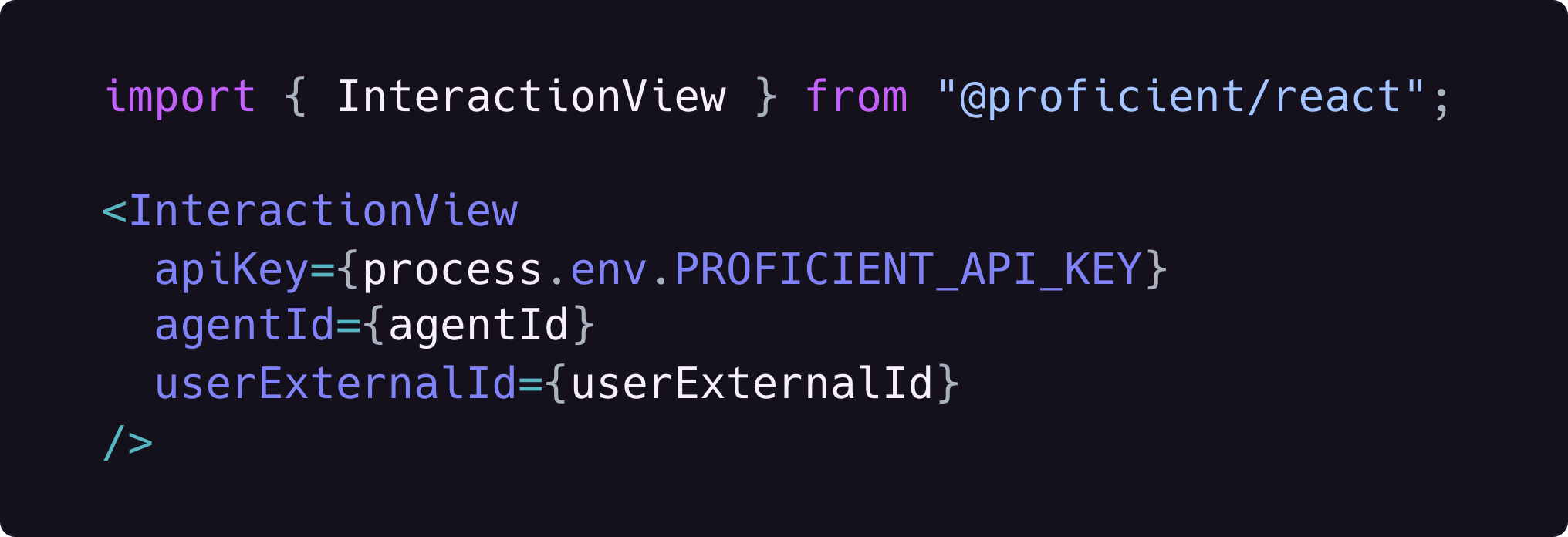
3. Add the prebuilt UI component to your app to connect it to the agent (3-5 lines of code)
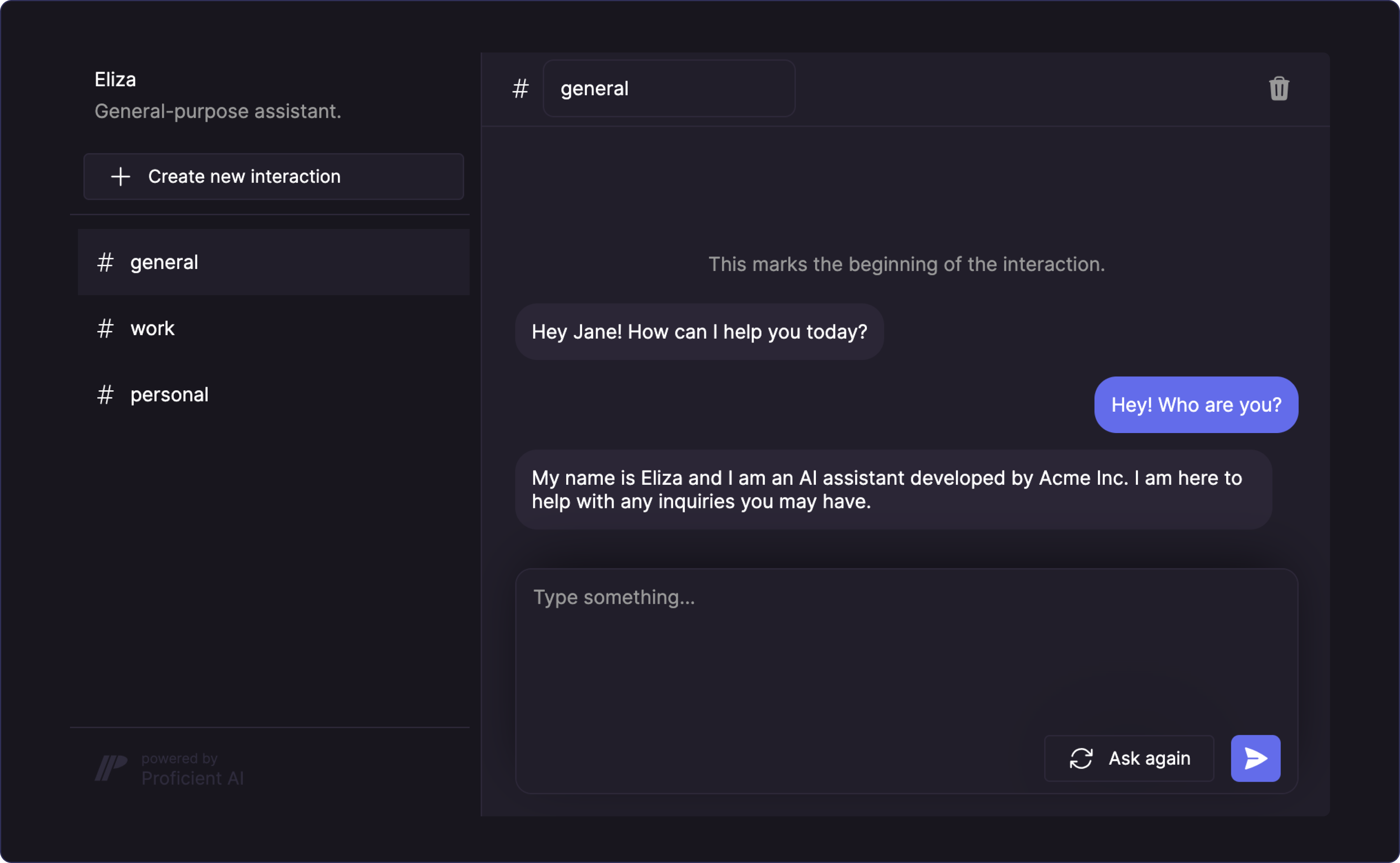
Done! The agent appears in a chat window with a persistent conversation history and your users
are ready to interact with it, once you deploy.
For more advanced features, you need to use the [API](#proficient-apis), which
lets you connect your agents to all parts of your application.
## Demo
Here is a short demo video (2 min, 28 sec) that shows how you can add an AI agent to your React application.
This demo is from 7 Apr 2023. We've built a lot features since then and will
add a new demo soon.
## What can I build with it?
Proficient agents are abstract virtual robots that can be used for various purposes. In your
application, you can present your agents in many forms such as:
* chatbots that know your business and respond to customer queries
* virtual tutors that teach your users a variety of subjects
* AI assistants that engage with your product's users
Basically, all types of applications that require an abstract AI entity to interact with their users can use a Proficient AI agent.
Reach out to us via [Discord](https://discord.gg/DVbwTM8erb) or
[email](mailto:anar@proficientai.com) if you're not sure whether you can use a
Proficient agent for your project. We'd be more than happy to help you.
## Architecture
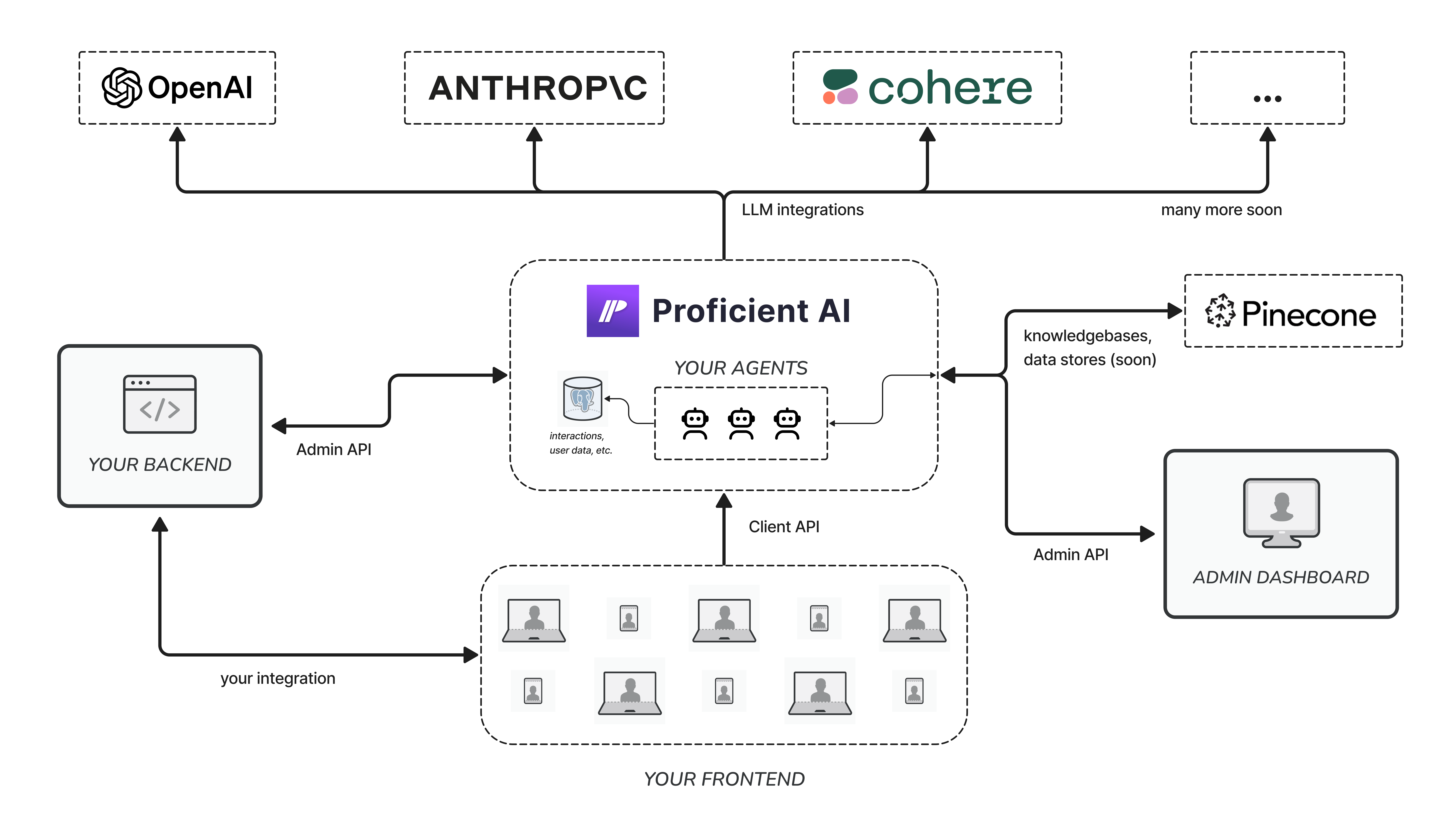
We can visualize the architecture of a typical application powered by Proficient AI with the following diagram.
### Key takeaways
There are a few key things to note here:
Agents are virtual entitites that you operate through the Proficient AI
platform.
Although simple use cases may not even need a custom backend.
Proficient is connected to many different models so you don't have to write
your own integration.
You can access your data at any time using the API or admin dashboard.
## Proficient APIs
All operations on the Proficient platform are divided into two categories each of which is represented by
a standalone API.
### 1. Client API
The [Client API](/client-api) is designed for client applications that are allowed to access only
a subset of all available operations. For example, agents can't be configured from a client application. On
the other hand, an authenticated user sending a message to an agent can be implemented with the Client API.
View all Client API endpoints and operations that you can carry out from your
client applications.
### 2. Admin API
The [Admin API](/admin-api) is used by backend applications. With admin-level
access, you can use this API to create, configure and delete agents, monitor interactions, update user data
and more.
View all Admin API endpoints and operations that you can carry out from
privileged environments.
 ## How it works
Here is a simple overview of the steps to get started:
1. Go to the [web dashboard](https://proficientai.com) and create an agent with the specified model
2. Customize the agent to your application's needs by editing its configuration
3. Add the prebuilt UI component to your app to connect it to the agent (3-5 lines of code)
Done! The agent appears in a chat window with a persistent conversation history and your users
are ready to interact with it, once you deploy.
## How it works
Here is a simple overview of the steps to get started:
1. Go to the [web dashboard](https://proficientai.com) and create an agent with the specified model
2. Customize the agent to your application's needs by editing its configuration
3. Add the prebuilt UI component to your app to connect it to the agent (3-5 lines of code)
Done! The agent appears in a chat window with a persistent conversation history and your users
are ready to interact with it, once you deploy.
 ### Key takeaways
There are a few key things to note here:
### Key takeaways
There are a few key things to note here: